

Cisco Umbrella Alternatives
To best answer the questions what is Cisco Umbrella – and why you may wish to look for Cisco Umbrella alternatives – it is necessary to go back to before the Umbrella brand existed to look at how the current suite of security solutions evolved.
The Cisco Umbrella suite of security solutions evolved from a free-to-use recursive DNS resolver that was launched in 2006 under the name OpenDNS. Originally funded by advertising revenues, the OpenDNS service enabled users to optionally block access to adult websites and benefit from a collaborative anti-phishing database that could prevent users visiting suspected phishing sites.
As the demand for Internet filtering solutions grew, OpenDNS launched Family Shield – a home Internet filtering service through which parents could control the content children could access on the Internet – and OpenDNS Enterprise, a subscription-based Internet filtering service for businesses that later supported integrations with management tools such as Active Directory.
The security capabilities of OpenDNS Enterprise expanded rapidly to include Internet filtering for off-site devices, threat intelligence services, and proxy inspection; and, in 2012, the capabilities of the OpenDNS Enterprise suite were combined into one package and renamed OpenDNS Umbrella. The following year, the suite of security solutions reached the milestone of 50 million users.

Get The FREE
HIPAA Compliance Checklist
Immediate Delivery of Checklist Link To Your Email Address
Please Enter Correct Email Address
Your Privacy Respected
HIPAA Journal Privacy Policy

Cisco Systems Inc. Acquires OpenDNS
In 2015, Cisco Systems Inc. acquired OpenDNS in a deal worth a reported $635 million and rebranded OpenDNS Umbrella as Cisco Umbrella. The free-to-use Family version of OpenDNS retained the OpenDNS branding; but, since the acquisition, Cisco has increased the number of OpenDNS services to four and now charges a subscription fee for the most advanced services.

The difference between the free plans is that you can use the Family Shield option without having to create an account whereas you have to sign up for the OpenDNS Home plan. The Family Shield plan does have some pre-configured filtering to block adult content, but it is less versatile than (say) the Google Chrome content filter; and, although both the free plans include parental controls for every device in the home, this is subject to the devices being connected to the home router. Smart kids will soon find ways to access the web without having to connect to the home router.
The VIP Home plan has slightly more functionality, but doesn´t provide as many filtering options as (say) Microsoft´s free Family Safety Service. Additionally, in tests the VIP Home plan failed to detect as many websites harboring malware as the Chrome, Edge, or Firefox browser filters, while the statistic reports failed to match visited websites with devices or users. The Prosumer Plan is a home office plan for up to five users and covers up to three devices each, but with regards to “faster, more reliable Internet”, Cisco´s DNS resolvers are far from being the fastest in the world.
Cisco OpenDNS Alternatives
It is difficult to comprehend why anybody might opt for an OpenDNS product when browser filters are often more reliable at detecting websites harboring malware and Microsoft´s free Family Safety Service offers more filtering options than the $19.95/year VIP Home plan. There is an argument that the phishing protection offered by the Prosumer plan should be beneficial in a home office environment; but, like many security solutions, phishing URLs are added retrospectively to the OpenDNS anti-phishing database. There is no real-time phishing protection in any Cisco OpenDNS or Cisco Umbrella product.
There are many free and low-cost Cisco OpenDNS alternatives available, but it is important to understand the limitations of each before implementing any of them. For example, Microsoft´s free Family Safety Service only works on the Edge browser and blocks all other browsers; and while Google Public DNS, Quad9, and 1.1.1.1 by Cloudflare are often cited as good Cisco OpenDNS alternatives, they lack category filtering capabilities and only block malware and adult content. Consequently, it can be better to look for Cisco Umbrella alternatives rather than OpenDNS alternatives.
What is Cisco Umbrella?
Since the acquisition of OpenDNS in 2015, Cisco Systems Inc. has increased the capabilities of the Cisco Umbrella suite. However, rather than including everything in a single package like the previous OpenDNS Umbrella, there are four Cisco Umbrella plans to choose from – ranging from a very basic web filter to an advanced secure access service edge (SASE) solution.
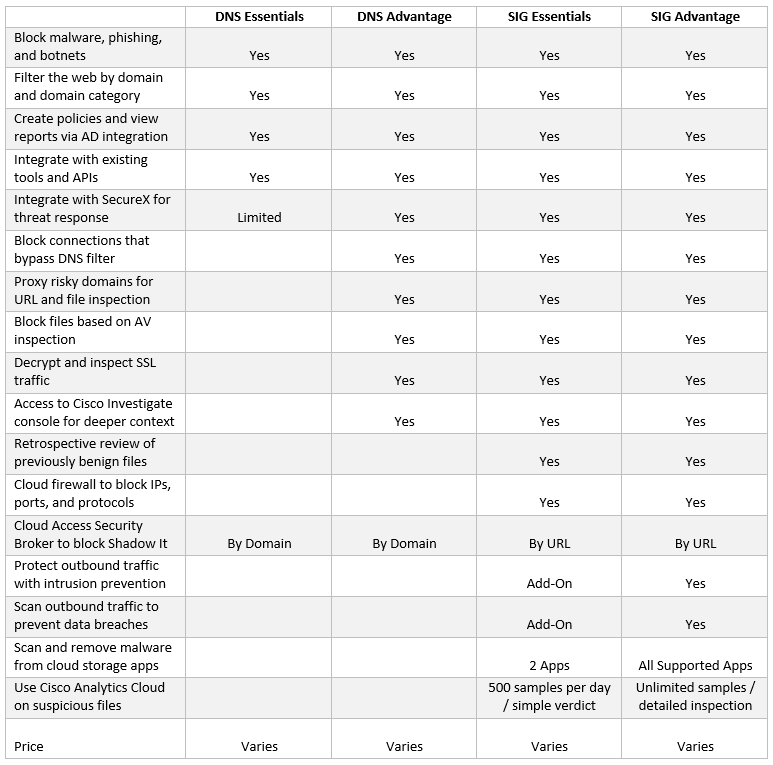
The above table is just a snapshot of the capabilities in each Cisco Umbrella plan to help identify the differences between all four. The full list of capabilities per plan can be downloaded from the Cisco Umbrella website. However, even with this limited selection of capabilities it is possible to determine that the DNS Essentials plan is useless because the filter in this plan doesn´t decrypt and inspect SSL traffic – and the SSL protocol is used by 81.1% of all websites.
Moving onto to the DNS Advantage plan, what the list of capabilities on the Cisco website doesn´t tell you is that you need to purchase Cisco Connect to cover users´ devices outside the corporate network, while the small print at the end of the list has further required add-ons if you wish to block connections that bypass the DNS filter (i.e., C2 callbacks), create policies and view reports via AD integration, or have any level of customer support beyond email.
Similarly, both Secure Internet Gateway (SIG) packages have multiple add-ons depending on (for example) the number of analyst licenses required to investigate suspicious files or suspicious activity. It also costs more to access the remote browser isolation controls or get technical support during the complicated onboarding process. The cost of these add-ons is rarely publicly disclosed. The reasons for this are discussed in our article “How Much Does Cisco Umbrella Cost?”
Why Look for Cisco Umbrella Alternatives?
Due to the limitations and the add-ons discussed above, many businesses look for an alternative to Cisco Umbrella that can better protect networks, users, and data against web-borne threats for less cost. Additionally, there are some known issues with enforcing SafeSearch in Umbrella policies and further issues for businesses in regulated industries due to Cisco Umbrella´s use of the AnyCast network for routing web traffic – which could send customer traffic anywhere in the world.
There is also no option for any of the Cisco Umbrella plans to be hosted locally, while some Managed Service Providers – who are unable to purchase the Investigate API to investigate the cause of clients´ problems – have reported issues with multi-tenancy. One further problem for some Managed Service Providers – although a commercial problem, rather than an operational problem – is that Cisco does not offer a white label option for Managed Service providers to add their own branding to the plans.
Cisco Umbrella Competitors
There are plenty of reasonably-priced DNS filtering solutions that are good Cisco Umbrella alternatives. Many have more capabilities and features than the DNS Security Advantage package included as standard and some even include features of the SIG packages at a lower cost than any Cisco Umbrella package. In some cases, Cisco Umbrella competitors´ prices start at little more than $1.00/user/month.
At its highest level, Cisco Umbrella is certainly a comprehensive DNS filtering solution, but many businesses will only need the level of protection provided by the DNS Security Advantage package – such as SSL inspection for risky domains. While the Cisco Umbrella costs can be justified in certain use cases, a look at Cisco Umbrella vs other solutions will reveal considerable cost savings are possible.
Some of the main competitors offering a cost-effective alternative to Cisco Umbrella are:
- TitanHQ – WebTitan Cloud
- Webroot DNS
- Citrix Secure Web Gateway
- Sophos Secure Web Gateway
- ZScaler Internet Access
- Forcepoint Secure Web Gateway
- Barracuda Web Security Gateway
- Infoblox Advanced DNS Protection
Cisco Umbrella FAQs
Why is web filtering important?
If you do not implement a web filter, you will have a hole in your security defenses that can easily be exploited by threat actors to gain access to your network and steal sensitive data. A web filter should form part of your security defenses alongside firewalls, email security gateways, antivirus software, data loss prevention solutions, and security awareness training.
How does DNS filtering work?
DNS filtering blocks attempts to visit malicious, NSFW, and websites that violate acceptable Internet use policies at the DNS layer. Filtering controls are applied during the DNS lookup stage of a web request, which means filtering takes place before any content is downloaded. If a website violates the policies set by the system administrator, the user will be directed to a local block page.
How should a web filter protect against phishing attacks?
A web filter should works in tandem with your email security gateway to provides time-of-click protection against malicious hyperlinks in phishing emails. A web filter should also prevent redirects from malicious adverts, and links to phishing websites sent via text message, instant messaging, and social media websites.
Where can I get more information on web filtering solutions?
It can be useful to get feedback from genuine users of web filtering solutions to find out about their experiences. In addition to speaking to the solution providers and reading their brochures, take some time to visit review sites for inside information on usability, support, and the disadvantages of the solutions on review websites such as G2, Software Advice, Expert Insights, and Capterra.
What web filters should I consider for my shortlist?
To save you time in your search for a suitable web filtering solution, we have performed a comparison of four of the main web filters used in healthcare to control internet access and block web-based threats. You can find out more about for of the main Cisco Umbrella alternatives in our Cisco Umbrella competitors post.
What is the significance of signing up for the free OpenDNS Home plan?
Although advertising was removed from the free OpenDNS plans in 2014, once Cisco has a customer´s contact details the company is frequently sending emails suggesting customers upgrade to a VIP plan or other product in the Cisco Systems portfolio. As most people that implement security solutions are security conscious, many will not unsubscribe from Cisco´s emails in case they miss news which is important or relevant to them.
Does it matter that phishing URLs are added retrospectively to the OpenDNS anti-phishing database?
It has been reported that up to 2.5 million websites are created each month for the sole purpose of phishing – some remaining active for less than half a day. Consequently, although the OpenDNS anti-phishing database provides some level of protection against phishing attacks, it does not protect users from visiting phishing websites that have been recently created due to the length of time it takes to report, review, and add a website to the database.
Why should web filters decrypt and inspect SSL traffic?
As mentioned above, 81.1% of websites have SSL certificates. This means that communications between the user and the website are encrypted. If a web filter cannot decrypt and inspect the content of a website, this means it is unable to identify threats or filter out adult content. According to the 2020 Q4 APWG Phishing Trends Report, 84% of phishing sites take advantage of the perceived safety of SSL certification to lull victims into a false sense of security.
What is the issue with Anycast for businesses in regulated industries?
The Anycast network allows for multiple virtual machines to share the same IP address. This enables web traffic to be routed via the fastest path – which is great to reduce latency and increase redundancy and which can also mitigate DDoS attacks. However, for businesses in regulated industries that have to know where certain types of data are at all times, the load balancing capabilities of the Anycast network means that data could be routed anywhere in the world.
Why might SASE solutions be inappropriate for many businesses?
It is not necessarily the case that SASE solutions are inappropriate, but rather that unless a business employs personnel that can understand and use the solutions, the business will be paying a lot of money for multiple features and capabilities that will never be used. Alternatively, if an IT team without sufficient knowledge to operate an SASE solution misconfigures a feature or capability and leaves gaps in network security, an error such as this could negate the benefits of SASE.